
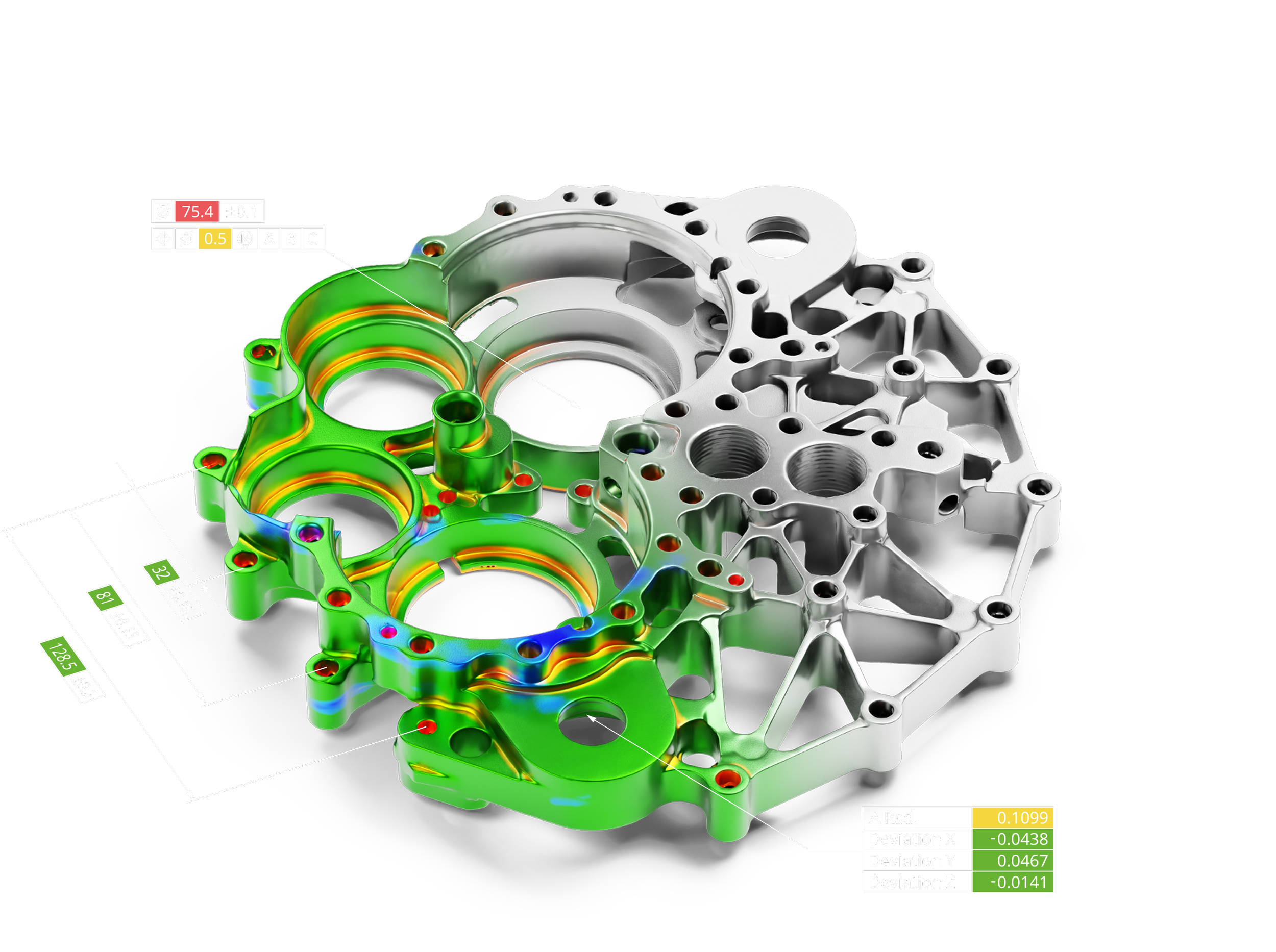
Geomagic Control X
Control X makes scan-based inspection easy for people of all walks of life. Famous for ease-of-use, Control X is accessible to engineers and non-engineers alike. With a highly intuitive interface and easy reporting, identifying and resolving quality problems has never been easier.
Spot Problems. Solve Them. Stay on Track.
With a complete view of your parts from scanning, Geomagic Control X gives you the tools to identify and resolve manufacturing and assembly issues. Understand the "how" and "why" behind defects to keep production moving smoothly.
Compare Scans to CAD
Intuitive, vivid color maps and 2D profiles show you exactly what's in or out of tolerance, and by how much.
Align the Way You Want
From automatic feature-based alignment to best-fit methods with constraints, Geomagic Control X streamlines it all.
Inspect Surface Damage or Wear
Detect even the slightest imperfections. Intelligently interpret a scanned object's ideal shape and measure deviations to quantify surface damage and wear with precision.
Combine 3D Scans with Probing
Enjoy the best of both worlds. With non-contact scanning and tactile probing in one integrated interface, Geomagic Control X supports walk-up inspections and pre-planned workflows with graphical and audio guidance.
Stay Ahead of Failures
Prevent downtime before it starts. Monitor how a part's geometry changes over time to spot potential issues early. With trend analysis and reporting, you'll predict failures before they happen and take action to keep operations running smoothly.
Which version is right for me?
| Essentials | Essentials Connect | Professional | |
|---|---|---|---|
| I/O | |||
| Import/Export Neutral CAD (IGES, STEP, etc.) | ✓ | ✓ | ✓ |
| Import/Export Neutral Scan (STL, PTS, etc.) | ✓ | ✓ | ✓ |
| Import/Export Native CAD & Scan data | ✕ | ✕ | ✓ |
| Import PMI CAD | ✕ | ✕ | ✓ |
| Import ASCII Geometry | ✕ | ✕ | ✓ |
| Automation | |||
| Repeatable Inspection (Replace Measured Data) | ✓ | ✓ | ✓ |
| Scan Process | ✕ | ✕ | ✓ |
| Batch Process | ✕ | ✕ | ✓ |
| Automation Server | ✓ | ✓ | ✓ |
| Visual Scripting | ✕ | ✕ | ✓ |
| Python Scripting | ✕ | ✕ | ✓ |
| Replace Reference Data | ✕ | ✕ | ✓ |
| Alignments | |||
| Initial Align | ✓ | ✓ | ✓ |
| Best fit | ✓ | ✓ | ✓ |
| RPS | ✓ | ✓ | ✓ |
| Datum | ✓ | ✓ | ✓ |
| 3-2-1 Alignment | ✓ | ✓ | ✓ |
| Coordinate Align | ✓ | ✓ | ✓ |
| Transform | ✓ | ✓ | ✓ |
| Adaptive | ✕ | ✓ | ✓ |
| Homing | ✕ | ✓ | ✓ |
| Compare | |||
| 3D Compare | ✓ | ✓ | ✓ |
| 2D Compare | ✓ | ✓ | ✓ |
| Compare Points | ✓ | ✓ | ✓ |
| Geometry Deviation | ✓ | ✓ | ✓ |
| Boundary Deviation | ✕ | ✕ | ✓ |
| Virtual Edge Deviation | ✕ | ✕ | ✓ |
| Silhouette Deviation | ✕ | ✕ | ✓ |
| Curve Deviation | ✕ | ✕ | ✓ |
| Plots | ✕ | ✕ | ✓ |
| Airfoil | ✕ | ✕ | ✓ |
| 2D Twist | ✕ | ✕ | ✓ |
| Deviation Location | ✕ | ✕ | ✓ |
| Reference Geometry | |||
| Simulated CMM Point | ✕ | ✓ | ✓ |
| All Other Ref Geom. (Vector, Plane, Pt. etc.) | ✓ | ✓ | ✓ |
| Scanner Direct Control | |||
| Scanner Plugins (Creaform, Shining 3D, etc.) | ✕ | ✓ | ✓ |
| LiveScan, LiveInspect, LiveGeometry, etc. | ✕ | ✓ | ✓ |
| Move Device, Probe Sequence, etc. | ✕ | ✓ | ✓ |
| CAD Tools | |||
| Delete | ✓ | ✓ | ✓ |
| Reverse Normal | ✓ | ✓ | ✓ |
| Convert to Mesh | ✓ | ✓ | ✓ |
| Assign Tolerance | ✓ | ✓ | ✓ |
| Transform Body | ✓ | ✓ | ✓ |
| Healing, Find Defect | ✓ | ✓ | ✓ |
| Sew, Split | ✕ | ✓ | ✓ |
| Offset, Thicken, Mirror, Separate | ✕ | ✓ | ✓ |
| Scan Tools (Mesh/Point) | |||
| All (Merge, Fill Holes, Filter Noise, etc.) | ✓ | ✓ | ✓ |
| Region Tools | |||
| All | ✓ | ✓ | ✓ |
| GD&T | |||
| All (2D & 3D) | ✓ | ✓ | ✓ |
| Curve Tools | |||
| Spline, Section, Intersection, Boundary | ✓ | ✓ | ✓ |
| Offset, Project, Mirror, Convert | ✕ | ✕ | ✓ |
| UV Curves, Fit Spline, Smooth, Trim, Extend | ✕ | ✕ | ✓ |
| Split, Match, Merge | ✕ | ✕ | ✓ |
| Insert & Remove Node, Remove Constraint | ✕ | ✕ | ✓ |
| Contour Curve from 3D Compare | ✕ | ✕ | ✓ |
| Multi-Result Inspection | |||
| Single-Result Inspection | ✓ | ✓ | ✓ |
| Multi-Result Inspection | ✕ | ✕ | ✓ |
| Report Tools | |||
| All | ✓ | ✓ | ✓ |
-
Yes. it interfaces directly with many devices on the market and can also import universal file types like STL, OBJ, and numerous point cloud formats.
-
Yes, Control X can import MBD and PMI from various CAD platforms and auto-populate GD&T callouts accordingly
-
Yes, you can automate and customize your inspection workflows with Visual Scripting and Automation Server capabilities.
-
Yes, Control X will generate intuitive & highly customizable reports in popular formats like PDF, PowerPoint, or Excel.